# Arduino UNO Q System
This is the base Nerves System configuration for the
[Arduino UNO Q](https://docs.arduino.cc/hardware/uno-q).
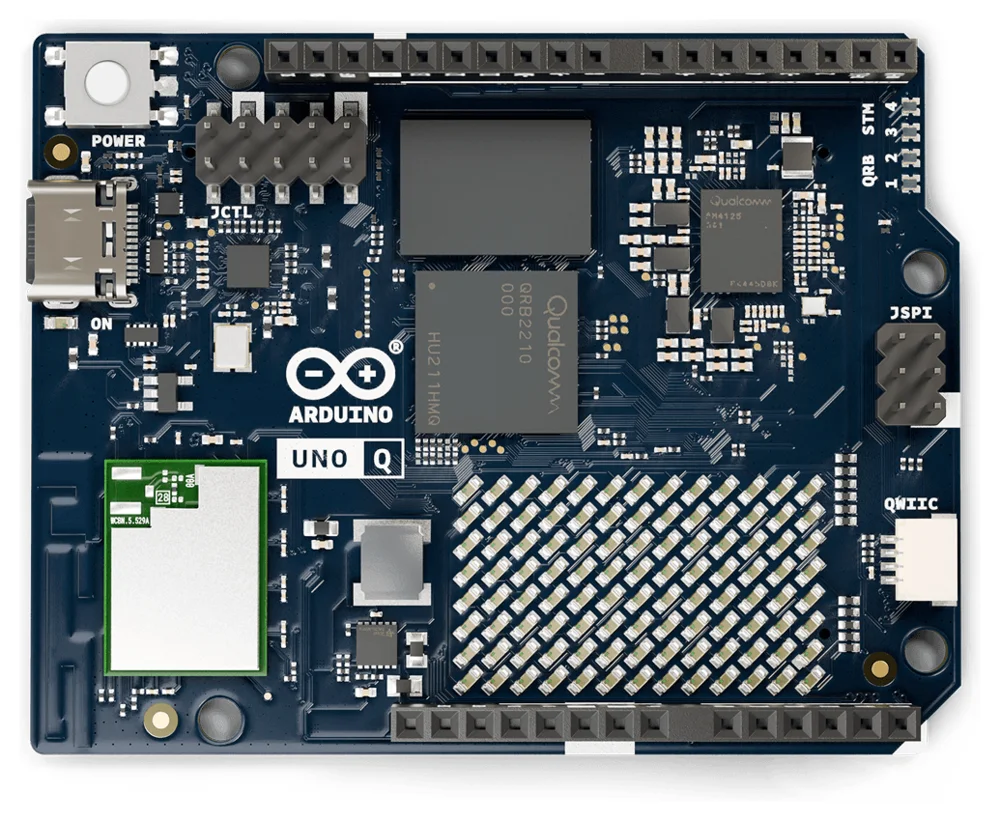
Image from the [Arduino documentation](https://github.com/arduino/docs-content), [CC-BY-SA-4.0](https://creativecommons.org/licenses/by-sa/4.0/)
| Feature | Description |
| -------------- | --------------------------------------------------- |
| CPU | Qualcomm QRB2210, quad-core Cortex-A53 |
| Memory | 2 GB or 4 GB LPDDR4 |
| Storage | 16 GB or 32 GB eMMC |
| Linux kernel | Mainline 7.2 |
| Bootloader | Arduino's U-Boot fork, loaded by Qualcomm's ABL |
| IEx terminal | UART `ttyMSM0` |
| USB | Ethernet gadget (`usb0`) for `mix upload` |
| GPIO, I2C, SPI | Yes - [Elixir Circuits](https://github.com/elixir-circuits) |
| WiFi | Yes - VintageNet (ath10k WCN3990) |
| Bluetooth | WCN3988, `hci0` comes up (otherwise untested) |
| MCU | STM32U585 via `arduino-router` and `unoq-mcu` |
| GPU | Adreno 702 kernel driver only - no Mesa userspace |
| Display | Kernel DRM/KMS with USB-C DisplayPort (untested) |
| Video codec | No - Venus fails to probe (see below) |
| Audio | No - not supported by the mainline device tree |
| Camera, ISP | No - not supported by the mainline device tree |
| DSP | ADSP runs, but nothing uses it yet |
This system is a work in progress.
## Using
Add the system to your Nerves project's dependencies with a target of your
choosing, for example `uno_q`:
```elixir
@all_targets [:uno_q]
defp deps do
[
# ...
{:nerves_system_arduino_uno_q, "~> 0.1", runtime: false, targets: :uno_q}
]
end
```
Nerves downloads the prebuilt system from the matching GitHub release. Then
build firmware with `MIX_TARGET=uno_q mix firmware`. See the
[Nerves getting started guide](https://hexdocs.pm/nerves/getting-started.html)
for setting up a project.
## Installing Nerves on a board
The first install, or a recovery, goes over USB using the QRB2210's Emergency
Download (EDL) mode, which is built into the chip. It works whatever is on the
eMMC, including Arduino's Debian image.
> **Warning:** provisioning erases the eMMC, including Arduino's Debian image and anything
> stored on it. To go back to Debian, flash Arduino's image with
> [`arduino-flasher-cli`](https://github.com/arduino/arduino-flasher-cli).
> The MCU's flash isn't touched.
You need [`fwup`](https://github.com/fwup-home/fwup#installing) installed. If
[`qdl`](https://github.com/linux-msm/qdl) isn't on your `PATH`,
`mix firmware.qdl` downloads Arduino's prebuilt `qdl` the first time, along
with Arduino's eMMC bootloader bundle.
On Linux, let your user access the board in EDL mode (USB `05c6:9008`) and keep
ModemManager away from it with a udev rule, for example in
`/etc/udev/rules.d/70-arduino-uno-q-edl.rules`:
```text
SUBSYSTEMS=="usb", ATTRS{idVendor}=="05c6", ATTRS{idProduct}=="9008", MODE="0660", GROUP="plugdev", ENV{ID_MM_DEVICE_IGNORE}="1"
```
Then run `sudo udevadm control --reload-rules && sudo udevadm trigger`. Use a
group your user is in if your distribution doesn't have `plugdev`.
To install:
1. Build the firmware: `MIX_TARGET=uno_q mix firmware`
2. Run `MIX_TARGET=uno_q mix firmware.qdl`. It prepares everything, then
waits for the board.
3. Unplug the UNO Q's USB-C cable.
4. Connect `GND` to `USB_BOOT` with a jumper or a wire. They're the two pins
in the rightmost column of the JCTL header.
5. Plug the USB-C cable back in, directly into your computer. `mix
firmware.qdl` notices the board and flashes it, which takes a minute or two.
6. Unplug the USB-C cable, remove the jumper and plug the cable back in. The
board boots Nerves.
After that, update the board over USB networking or WiFi with `mix upload`.
### Troubleshooting
* If `mix firmware.qdl` never sees the board, check the jumper and that it was
fitted before the cable was plugged in. In EDL mode the board shows up as
`05c6:9008` in `lsusb`.
* If `qdl` can't open the device, check the udev rule. If the `qcserial`
kernel module has claimed the board (it shows up as `/dev/ttyUSB*`), unload
it with `sudo modprobe -r qcserial` or blacklist it.
* If flashing fails partway through, use a different USB port or cable. Hubs,
docks and some USB 3 ports cause trouble.
## Boot chain
Qualcomm's boot firmware (PBL, XBL, ABL) is left as Arduino ships it. ABL loads
U-Boot from the Android boot image in the `boot_a` partition. U-Boot keeps its
environment in the eMMC at 4 MiB and uses the standard Nerves A/B logic to load
the kernel and device tree from a FAT boot partition. U-Boot also adds the
board's WiFi MAC and Bluetooth addresses to the device tree.
## eMMC layout
Partitions 1 to 66 are Qualcomm's and are never written by Nerves. The Nerves
partitions replace Arduino's `efi`, `rootfs` and `userdata` partitions at the
end of the GPT:
| Partition | Name | Contents |
| --------- | -------- | -------------------------------- |
| 67 | boot_a | FAT: `Image`, device tree |
| 68 | boot_b | FAT: `Image`, device tree |
| 69 | rootfs_a | squashfs root filesystem |
| 70 | rootfs_b | squashfs root filesystem |
| 71 | data | f2fs application data |
fwup can't write a GPT with this many entries, so `mix firmware.qdl` writes
the partition table and fwup only writes inside it. The offsets in
`fwup_include/fwup-common.conf` must match `lib/nerves_system_arduino_uno_q/qdl.ex`;
the tests check that they do.
The eMMC's `boot0` hardware partition holds the board's WiFi MAC address,
Bluetooth address and board revision. U-Boot reads them; nothing in Nerves
writes to `boot0`.
## WiFi and the modem
The WiFi firmware runs on the QRB2210's modem remote processor. Before the
modem can boot it needs two helpers from
[linux-msm](https://github.com/linux-msm): `rmtfs`, which serves the modem's
storage partitions (read-only) and then starts the modem, and `tqftpserv`,
which serves it the WiFi firmware. `/usr/sbin/uno-q-init` starts both from
erlinit's `--pre-run-exec`, before the Erlang VM starts, and restarts them if
they exit. `wlan0` appears about 13 seconds after power on.
## The STM32U585 MCU
`uno-q-init` also runs Arduino's
[arduino-router](https://github.com/arduino/arduino-router), the MsgPack-RPC
link to the MCU over `/dev/ttyHS1`, as Arduino's Debian image does. Programs
talk to the MCU through `/var/run/arduino-router.sock`. When the router is
ready it raises GPIO 70, which tells the MCU that Linux is up.
The MCU is flashed over SWD, bit-banged from the QRB2210's GPIOs by OpenOCD.
`unoq-mcu` wraps the common operations:
```sh
unoq-mcu animation # install the Nerves boot animation
unoq-mcu sketch loader.elf sketch.bin # flash a loader and sketch
unoq-mcu dump /tmp/mcu.bin # read the MCU's flash
unoq-mcu reset
```
The MCU's loader plays a boot animation on the LED matrix until GPIO 70 goes
high. `unoq-mcu animation` replaces Arduino's animation with a Nerves logo.
To run your own sketch, build it with `arduino-cli compile -b arduino:zephyr:unoq`
and flash the core's loader (`firmwares/zephyr-arduino_uno_q_stm32u585xx.elf`)
with the sketch's `.elf-zsk.bin`:
```sh
unoq-mcu sketch zephyr-arduino_uno_q_stm32u585xx.elf my_sketch.ino.elf-zsk.bin
```
Sketches using [Arduino_RouterBridge](https://github.com/arduino-libraries/Arduino_RouterBridge)
can then provide and call methods through the router, as they do on Arduino's
Debian image.
## Multimedia and accelerators
The mainline kernel and device tree support less of the QRB2210 than
Arduino's kernel fork does:
* **GPU** (Adreno 702): the `msm` DRM driver binds, loads its firmware and
provides `/dev/dri/renderD128`. The system has no Mesa, so there's no
OpenGL ES or Vulkan.
* **Display**: the display controller, DSI and the ANX7625 bridge for
DisplayPort over USB-C come up as DRM `card0` with a `DP-1` connector. It
hasn't been tested with a monitor, and nothing in the system drives it.
* **Video codec** (Venus, AR50-Lite): the driver asks for
`qcom/venus-6.0/venus.mbn`, which isn't installed, so it fails to probe.
linux-firmware's AR50-Lite firmware is `qcom/vpu/ar50lt_p1_gen2_s6.mbn`.
While the codec is unprobed, the clock controller and interconnects never
finish their `sync_state`, so unused clocks and bandwidth stay enabled.
* **Audio**: the ADSP remote processor boots, but the mainline device tree
has no sound card, so there's no ALSA playback or capture.
* **Camera and ISP**: CAMSS is disabled in the mainline device tree and the
OPE image signal processor driver only exists in Arduino's kernel.
* **DSP compute**: `/dev/fastrpc-adsp` exists, but the system has no FastRPC
library or Hexagon runtime. The QRB2210 has no separate compute DSP.
Audio, camera and the ISP need Arduino's out-of-tree kernel patches.