This is the base Nerves System configuration for the Arduino UNO Q.
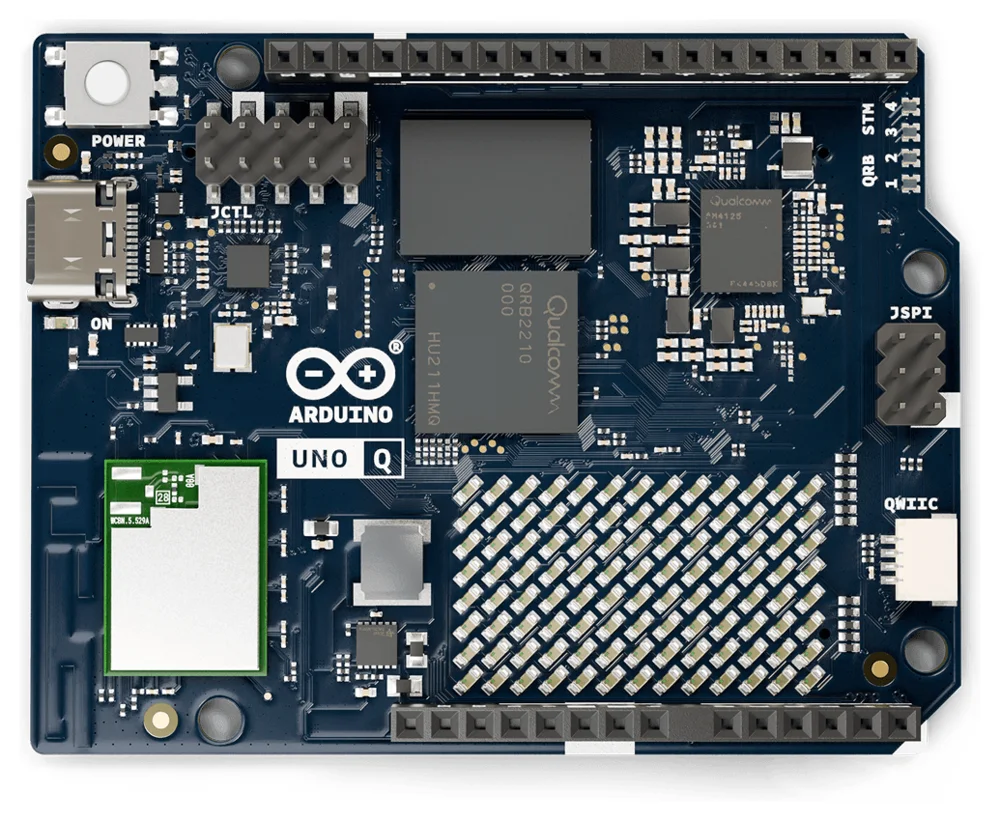
<sup>Image from the [Arduino documentation](https://github.com/arduino/docs-content), [CC-BY-SA-4.0](https://creativecommons.org/licenses/by-sa/4.0/)</sup>
| Feature | Description |
|---|---|
| CPU | Qualcomm QRB2210, quad-core Cortex-A53 |
| Memory | 2 GB or 4 GB LPDDR4 |
| Storage | 16 GB or 32 GB eMMC |
| Linux kernel | Mainline 7.2 |
| Bootloader | Arduino's U-Boot fork, loaded by Qualcomm's ABL |
| IEx terminal | UART ttyMSM0 |
| USB | Ethernet gadget (usb0) for mix upload |
| GPIO, I2C, SPI | Yes - Elixir Circuits |
| WiFi | Yes - VintageNet (ath10k WCN3990) |
| Bluetooth | WCN3988, hci0 comes up (otherwise untested) |
| MCU | STM32U585 via arduino-router and unoq-mcu |
| GPU | Adreno 702 kernel driver only - no Mesa userspace |
| Display | Kernel DRM/KMS with USB-C DisplayPort (untested) |
| Video codec | No - Venus fails to probe (see below) |
| Audio | No - not supported by the mainline device tree |
| Camera, ISP | No - not supported by the mainline device tree |
| DSP | ADSP runs, but nothing uses it yet |
This system is a work in progress.
Using
Add the system to your Nerves project's dependencies with a target of your
choosing, for example uno_q:
@all_targets [:uno_q]

defp deps do
  [
    # ...
    {:nerves_system_arduino_uno_q, "~> 0.1", runtime: false, targets: :uno_q}
  ]
end
Nerves downloads the prebuilt system from the matching GitHub release. Then
build firmware with MIX_TARGET=uno_q mix firmware. See the
Nerves getting started guide
for setting up a project.
Installing Nerves on a board
The first install, or a recovery, goes over USB using the QRB2210's Emergency Download (EDL) mode, which is built into the chip. It works whatever is on the eMMC, including Arduino's Debian image.
Warning: provisioning erases the eMMC, including Arduino's Debian image and anything stored on it. To go back to Debian, flash Arduino's image with
arduino-flasher-cli. The MCU's flash isn't touched.
You need fwup installed. If
qdl isn't on your PATH,
mix firmware.qdl downloads Arduino's prebuilt qdl the first time, along
with Arduino's eMMC bootloader bundle.
On Linux, let your user access the board in EDL mode (USB 05c6:9008) and keep
ModemManager away from it with a udev rule, for example in
/etc/udev/rules.d/70-arduino-uno-q-edl.rules:
SUBSYSTEMS=="usb", ATTRS{idVendor}=="05c6", ATTRS{idProduct}=="9008", MODE="0660", GROUP="plugdev", ENV{ID_MM_DEVICE_IGNORE}="1"Then run sudo udevadm control --reload-rules && sudo udevadm trigger. Use a
group your user is in if your distribution doesn't have plugdev.
To install:
- Build the firmware:
MIX_TARGET=uno_q mix firmware - Run
MIX_TARGET=uno_q mix firmware.qdl. It prepares everything, then waits for the board. - Unplug the UNO Q's USB-C cable.
- Connect
GNDtoUSB_BOOTwith a jumper or a wire. They're the two pins in the rightmost column of the JCTL header. - Plug the USB-C cable back in, directly into your computer.
mix firmware.qdlnotices the board and flashes it, which takes a minute or two. - Unplug the USB-C cable, remove the jumper and plug the cable back in. The board boots Nerves.
After that, update the board over USB networking or WiFi with mix upload.
Troubleshooting
- If
mix firmware.qdlnever sees the board, check the jumper and that it was fitted before the cable was plugged in. In EDL mode the board shows up as05c6:9008inlsusb. - If
qdlcan't open the device, check the udev rule. If theqcserialkernel module has claimed the board (it shows up as/dev/ttyUSB*), unload it withsudo modprobe -r qcserialor blacklist it. - If flashing fails partway through, use a different USB port or cable. Hubs, docks and some USB 3 ports cause trouble.
Boot chain
Qualcomm's boot firmware (PBL, XBL, ABL) is left as Arduino ships it. ABL loads
U-Boot from the Android boot image in the boot_a partition. U-Boot keeps its
environment in the eMMC at 4 MiB and uses the standard Nerves A/B logic to load
the kernel and device tree from a FAT boot partition. U-Boot also adds the
board's WiFi MAC and Bluetooth addresses to the device tree.
eMMC layout
Partitions 1 to 66 are Qualcomm's and are never written by Nerves. The Nerves
partitions replace Arduino's efi, rootfs and userdata partitions at the
end of the GPT:
| Partition | Name | Contents |
|---|---|---|
| 67 | boot_a | FAT: Image, device tree |
| 68 | boot_b | FAT: Image, device tree |
| 69 | rootfs_a | squashfs root filesystem |
| 70 | rootfs_b | squashfs root filesystem |
| 71 | data | f2fs application data |
fwup can't write a GPT with this many entries, so mix firmware.qdl writes
the partition table and fwup only writes inside it. The offsets in
fwup_include/fwup-common.conf must match lib/nerves_system_arduino_uno_q/qdl.ex;
the tests check that they do.
The eMMC's boot0 hardware partition holds the board's WiFi MAC address,
Bluetooth address and board revision. U-Boot reads them; nothing in Nerves
writes to boot0.
WiFi and the modem
The WiFi firmware runs on the QRB2210's modem remote processor. Before the
modem can boot it needs two helpers from
linux-msm: rmtfs, which serves the modem's
storage partitions (read-only) and then starts the modem, and tqftpserv,
which serves it the WiFi firmware. /usr/sbin/uno-q-init starts both from
erlinit's --pre-run-exec, before the Erlang VM starts, and restarts them if
they exit. wlan0 appears about 13 seconds after power on.
The STM32U585 MCU
uno-q-init also runs Arduino's
arduino-router, the MsgPack-RPC
link to the MCU over /dev/ttyHS1, as Arduino's Debian image does. Programs
talk to the MCU through /var/run/arduino-router.sock. When the router is
ready it raises GPIO 70, which tells the MCU that Linux is up.
The MCU is flashed over SWD, bit-banged from the QRB2210's GPIOs by OpenOCD.
unoq-mcu wraps the common operations:
unoq-mcu animation                      # install the Nerves boot animation
unoq-mcu sketch loader.elf sketch.bin   # flash a loader and sketch
unoq-mcu dump /tmp/mcu.bin              # read the MCU's flash
unoq-mcu reset
The MCU's loader plays a boot animation on the LED matrix until GPIO 70 goes
high. unoq-mcu animation replaces Arduino's animation with a Nerves logo.
To run your own sketch, build it with arduino-cli compile -b arduino:zephyr:unoq
and flash the core's loader (firmwares/zephyr-arduino_uno_q_stm32u585xx.elf)
with the sketch's .elf-zsk.bin:
unoq-mcu sketch zephyr-arduino_uno_q_stm32u585xx.elf my_sketch.ino.elf-zsk.bin
Sketches using Arduino_RouterBridge can then provide and call methods through the router, as they do on Arduino's Debian image.
Multimedia and accelerators
The mainline kernel and device tree support less of the QRB2210 than Arduino's kernel fork does:
- GPU (Adreno 702): the
msmDRM driver binds, loads its firmware and provides/dev/dri/renderD128. The system has no Mesa, so there's no OpenGL ES or Vulkan. - Display: the display controller, DSI and the ANX7625 bridge for
DisplayPort over USB-C come up as DRM
card0with aDP-1connector. It hasn't been tested with a monitor, and nothing in the system drives it. - Video codec (Venus, AR50-Lite): the driver asks for
qcom/venus-6.0/venus.mbn, which isn't installed, so it fails to probe. linux-firmware's AR50-Lite firmware isqcom/vpu/ar50lt_p1_gen2_s6.mbn. While the codec is unprobed, the clock controller and interconnects never finish theirsync_state, so unused clocks and bandwidth stay enabled. - Audio: the ADSP remote processor boots, but the mainline device tree has no sound card, so there's no ALSA playback or capture.
- Camera and ISP: CAMSS is disabled in the mainline device tree and the OPE image signal processor driver only exists in Arduino's kernel.
- DSP compute:
/dev/fastrpc-adspexists, but the system has no FastRPC library or Hexagon runtime. The QRB2210 has no separate compute DSP.
Audio, camera and the ISP need Arduino's out-of-tree kernel patches.